
 Trustpilot - Rated Excellent
 In-house Design & Print
 Express Production Options
 Instant Credit for Businesses
  Newsletter
Artwork Requirements
Please Read our Helpful Guide
- Home
- Supply Artwork
- Artwork Requirements
Below is a summary of our Artwork Requirements to help you supply Print-Ready Files, whether created
in-house or by a third party. Contact Us if you are unsure of anything outlined below.
Accepted vs Not Accepted
| Accepted ✔ | Not Accepted ✖ |
| Template Specific Requirements Have Been Followed Each product may have specific artwork requirements, which are detailed in the requirements section of our artwork templates. |
Artwork Set To Any Other Size We won’t accept any artwork which has been set to any other size than that required by each product, specified in the artwork template. |
| Correct Size For Product All of our templates specify the correct artwork size for each product. They also indicate the dimensions of any safe areas, bleed areas and non-visible areas. |
Incorrect Template Used Some of our products will be named the same but have size variations (e.g. Swift 800, Swift 1000) . Please unsure you are using the correct template for your chosen product. |
| Resolution Set To 300dpi If using raster images (.jpg .jpeg .png .tiff etc.) and working at 25% (Quarter) scale as shown on most of our templates. |
Old Template Used Some of our products can change over time to suit new printing techniques. Please check our website for the latest artwork template for your product or contact us if you are unsure. |
| All Layers Other Than Artwork Are Hidden Especially when using our templates, we have ‘Guide’ & ‘Information’ layers which must be hidden before exporting/saving artwork. |
Extra Markings (Bleed, Crop, Registration Marks) None of our products require any extra marks to be added when saved. These may be printed if missed during the proofing stage. |
| CMYK Colour Used | Overprint Used We don’t require any overprint to be used throughout artwork. This can cause printing issues and is easily missed during proofing. |
| Correct Bleed Added (If Required) Some of our products, especially fabrics, will require a specific bleed. This size will be shown on the artwork template. |
RGB/Pantone Colours Used We do automatically convert to CMYK but this may print with unexpected results. More information below for colour matching |
| All Images Embedded If your artwork has linked images, please embed them to avoid any missing links when exporting. |
Multiple Artworks On One Page We prefer your artwork to be split into separate files to ensure nothing is missed when proofing. |
| All Fonts Outlined Text to be converted to shapes or outlines to avoid missing font errors |
File Formats
| Accepted ✔ | Not Accepted ✖ |
| High-Resolution PDF This is our preferred artwork format and is strongly recommended when exporting your files. Using this format helps minimise resolution issues and print errors, and can also speed up the proofing process. |
.DOC .DOCX (Word Document) |
| .SVG .AI .EPS (Other Vector Formats) If you are unable to export your artwork as a PDF, these formats are the next best option for retaining vector information. Please note that using these formats may slow down the proofing process, as it can take longer for us to check your artwork for any errors. |
.PPT (PowerPoint) |
| JPG .JPEG .TIFF .PNG .PSD (Least Preferred) We can accept these formats; however, they are not recommended for print-ready artwork. If you use them, please ensure all images are flattened and set to 300dpi. |
.PUB (Publisher) |
| .XLS .XLSX (Excel) | |
| .CDR (Coral Draw) | |
| .INDD (Adobe Indesign) | |
| .QXP (Quark Xpress) | |
| We are unable to use any of the above formats as print-ready artwork. However, we do offer graphic design services (at an additional cost) to help convert your files into print-ready artwork for the best possible print quality. Please see our website or contact us for more information about our design services. |
Colour Matching
If you would like to colour match or are using Pantone® references in your artwork, we strongly recommend contacting us in advance. We can discuss the options available with our printing processes and software, and advise you if a specific colour cannot be accurately reproduced before your order goes into production.
Small test prints are available to order if you would like to see how your colours look on a chosen material.
True/Rich Blacks
‘True black’ or ‘rich black’ can be a different CMYK value depending on the product and material being printed. For the best possible result, we recommend contacting us first so we can advise the most suitable CMYK black for your specific job.


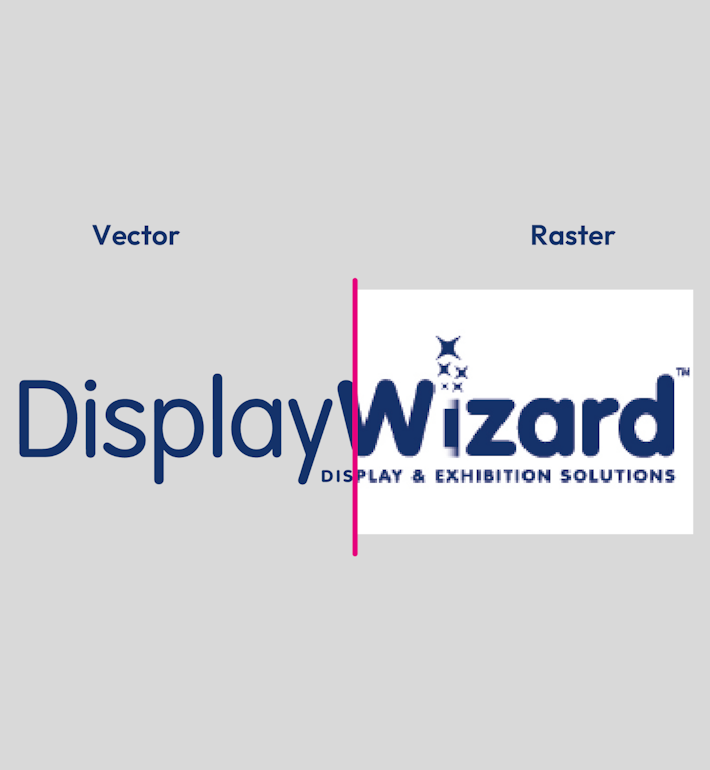
Vector vs Raster
When producing graphics for large format print, vector artwork will deliver the cleanest results and is strongly recommended. High-resolution raster images (exported at 300dpi at final size) can work well, but they will never match the scalability and sharpness of vector artwork
| Vector | Raster |
| Clean & Precise Edges | Pixelated or Blurry |
| Scalable To Any Size | Resolution Is Affected When Scaled |
| Transparent Background | Most Formats Will Have A White Background |
| Fully Editable | Not Directly Editable |
| Print Perfect Everytime | Print Quality Not Guaranteed |
Please Note
While we carefully prepare your files for print, we cannot be held responsible for errors contained within the supplied artwork, including spelling mistakes, grammar errors, overprint settings, low resolution elements, missing fonts or images. Please ensure your artwork is thoroughly checked and our artwork guidelines are followed to help avoid these issues.
Need help? If you have any issues following our guidelines or need further help and advice artwork@displaywizard.co.uk or call 01995 606633